My first serious vision project was a robot that played tic-tac-toe against people: a camera over the board, classic image processing to read the state, Minimax to pick the move. Not a single neural network in the loop. That project lives on the XOX robot page, and years and several YOLO pipelines later, I still reach for the same handful of operations every week. Not out of nostalgia. They solve steps that networks do not.
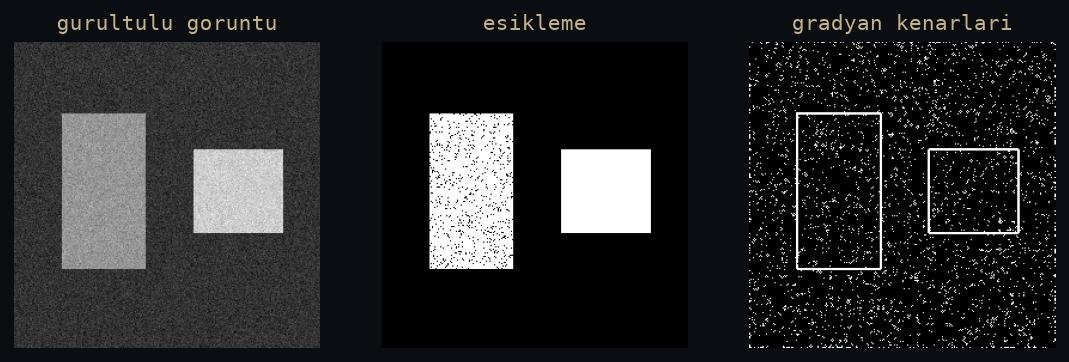 Figure: rendered by me on synthetic data.
Thresholding is still my first move
Thresholding turns a grayscale image into a decision: this pixel matters, this one does not. The fixed version, everything above value T is white, breaks the moment the lighting changes. Otsu’s method picks T from the histogram, which handles a lamp being swapped. Adaptive thresholding computes a local T per neighbourhood, which handles the light being uneven across the frame.
On the XOX board the light was never even, one side of the desk was always brighter, so adaptive was the only version that survived. The general lesson stuck with me: pick the threshold method based on how your lighting fails, not on which one is newest.
My working order has not changed in years: try the fixed threshold first because it is free to reason about, switch to Otsu when the histogram is clearly bimodal, and go adaptive the moment the scene has a lighting gradient. Ten seconds of looking at the histogram tells you which case you are in. And when none of the three works, the problem is almost never the threshold. It is the channel you are feeding it.
The other half of the trick is thresholding the right channel. For colour targets, convert to HSV and threshold hue, because RGB mixes colour and brightness into the same numbers. And in thermal work the image is a single channel to begin with, which changes the game entirely: I wrote about that in thermal imaging for detection work.
Morphology cleans up what the threshold leaves
No threshold gives you a clean mask. You get salt noise where the sensor disagreed with you and holes where a reflection ate the target. Morphology fixes both with two building blocks: erosion shrinks white regions, dilation grows them. Opening, an erosion then a dilation, deletes specks smaller than the kernel. Closing, the reverse order, fills holes smaller than the kernel.
The kernel size is the whole decision. Make it just big enough to remove what you consider noise and no bigger, or you start eating the objects you wanted. My rule: if I am tuning a threshold endlessly to get a clean mask, I stop, accept the dirty mask, and let one opening do in a millisecond what another hour of tuning would not.
Two smaller knobs matter more than people expect. Kernel shape: I default to an ellipse, because a rectangular kernel leaves blocky corners on organic shapes and grows diagonals unevenly. And iterations: two passes with a small kernel are gentler and more controllable than one pass with a large one. If a mask needs more help than that, morphology is the wrong tool, and I go back one stage and fix the threshold or the channel instead.
Contours turn a mask into objects
findContours is where pixels become things. You get closed boundaries,
and from each one: area, aspect ratio, centroid through moments. Filter by
area to kill leftover noise, filter by aspect ratio to keep the shapes you
expect, and suddenly you have detections without any training data.
On the XOX robot, telling an X from an O came down to contour hierarchy: an O has an inner contour, an X does not. One if statement did the job a classifier would do today, ran instantly, and never needed a dataset. In a controlled scene, that trade is still worth taking, and when contours are not enough, an edge detector like Canny in front of them usually is.
If you want the hierarchy trick, ask findContours for it explicitly: the
retrieval mode decides whether you get a flat list or the parent and child
tree. RETR_TREE gives you the full nesting, and every contour arrives with
the index of its parent. That one array turns a pile of boundaries into
structure, which is exactly what reading a game board needs.
Case study: from camera frame to board matrix
The XOX robot is the cleanest end-to-end example of these operations I have, so let me walk the whole line once, stage by stage. The task: watch a physical tic-tac-toe board through a camera, turn it into a 3x3 matrix of empty, X and O, hand that matrix to Minimax, and let an industrial robot arm play the answer. Everything before Minimax in that sentence is classic image processing, and it maps one to one onto the sections above.
Step 1, threshold. The frame is converted to grayscale and goes straight into adaptive thresholding. A global threshold was the first thing I tried and the first thing that failed: one half of the desk was brighter, so half of the board came out solid white. Adaptive thresholding computes a local threshold per neighbourhood, and the grid lines and the pen strokes survive on both halves of the board.
Step 2, morphology. The raw mask carries sensor speckle, plus small gaps where a stroke ran thin. One opening with a small elliptical kernel deletes the speckle, one closing seals the gaps so every drawn symbol becomes a single connected region. Without the closing, a shaky X can fall apart into separate blobs and everything downstream miscounts the board.
Step 3, contours. findContours runs on the clean mask with the tree
retrieval mode, so every boundary arrives with its parent and child
relationships. An area filter throws away whatever the opening missed. The
largest structure is the grid itself, and its geometry pins down where the
nine cells sit in the frame, so I never needed markers or a manual
calibration step every time the camera shifted a little.
Step 4, classify each cell. Each of the nine cells is now a small region of the mask holding at most one symbol. An empty cell has no contour above the noise floor. A cell with a symbol gets the hierarchy test from the previous section: if the outer contour contains an inner contour, it is an O; if not, it is an X. Three possible answers per cell, nine cells, and the physical board has become a 3x3 matrix.
Step 5, decide and act. The matrix is game state, and from here vision is done. Minimax searches the state and picks the move, and the industrial robot arm plays it on the physical board. The console output below is the moment the whole pipeline comes together: the board matrix as read from the camera, with the move decision printed next to it.
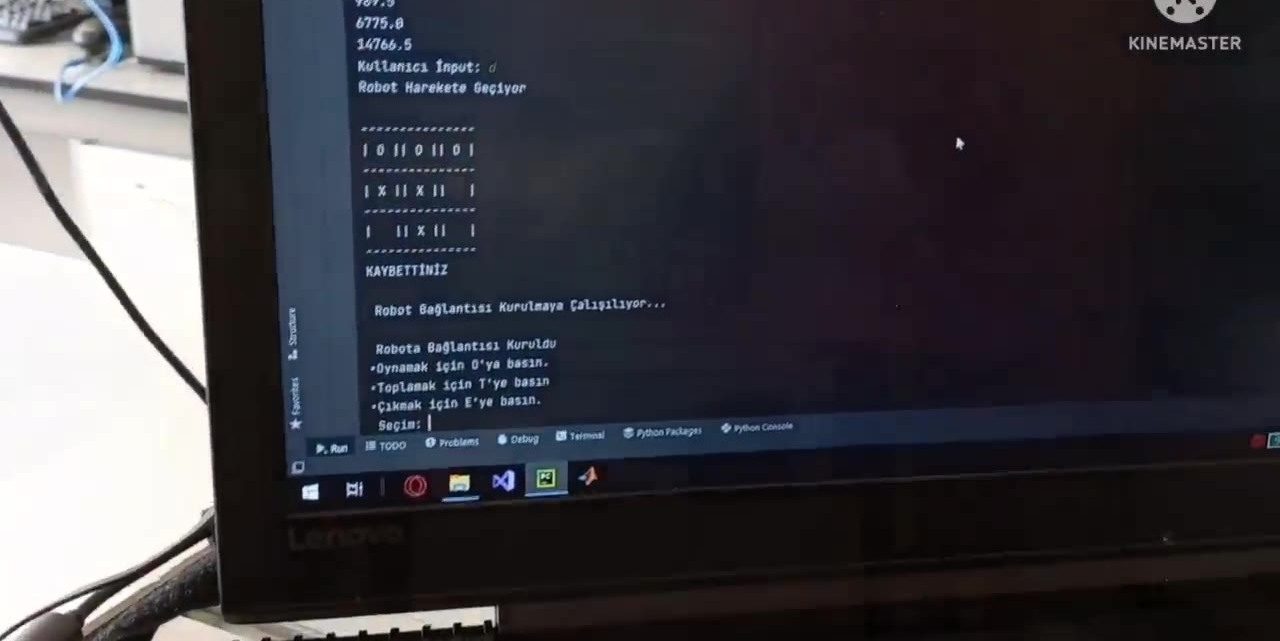 Frame: real output from the project.
The point of the case is not that a robot can play tic-tac-toe. The point is that every stage of the pipeline is a picture you can save and look at. When a cell was misread, I dumped the threshold output, the mask after morphology and the contours to disk, and the broken stage was obvious in minutes. Try doing that with the intermediate activations of a network. The full build, arm included, is on the XOX robot project page.
The classics do not retire, they move into the pipeline
Every detector I have shipped is wrapped in classic operations. Resizing and letterboxing before the network. Masks that cut false positives from regions you know are irrelevant. Post-processing like NMS, which I covered in the last, underrated step of detection. In the sports tracking work the interesting events sit on top of the detector, and reasoning about them is geometry and masks, not weights.
None of this is an argument against learning. When the target is a person seen from a drone or a player on a crowded pitch, I train a detector and do not look back. The split I use is simple: the network answers what is in the frame, and the classics answer everything before and after that question. Feed the network clean, masked, properly sized input, and clean up what comes out of it. Both halves of that split are what separates a demo from a product.
The quiet superpower is debugging. When a pipeline misbehaves, I dump every intermediate image to disk and look at them. The person who knows what a threshold or a dilation should look like finds the broken stage in minutes. The fundamentals are not the old way. They are the part of the pipeline you can actually see.