Most of my computer vision work ends up in front of a person. On the defence side that person is an operator watching a live tracking feed, and the screen they watch is built in Qt with C++. The model gets the papers and the demos. The interface decides whether anyone can actually use the system. Here is what the field taught me.
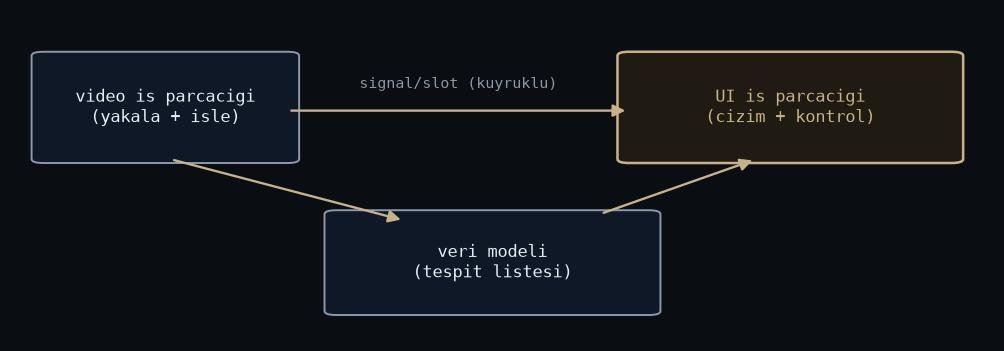
Figure: rendered by me.
The GUI thread is not a work thread
The single most important rule: nothing heavy runs on the GUI thread. Not capture, not decode, not inference, not tracking. All of that lives in worker threads, and results cross into the UI through signals and slots with queued connections.
Break this rule and the failure mode is nasty. The event loop blocks, the screen freezes, and it freezes at exactly the wrong moment, because the moment the pipeline works hardest is the moment the operator most needs the display. A slot on the GUI thread should do one thing: update widgets. Everything else belongs elsewhere. I wrote more about the threading side in C++ multithreading for real-time pipelines.
Draw video like you mean it
The naive display path is cv::Mat to QImage to QPixmap to a QLabel, every frame, with a full copy at each step. At webcam resolution you get away with it. At high resolution and high frame rate you do not. Reuse buffers, paint directly in paintEvent, and move to QOpenGLWidget when plain widget painting stops keeping up.
The second half of this: never let the frame queue grow. If the UI falls behind the pipeline, drop frames and show the newest one. A tracking operator needs to see now. A smooth video of five seconds ago is worse than a choppy video of the present, because decisions get made against it.
Design for a stressed operator, not for you
The interface looks fine on my desk. The field is different: direct sunlight, gloves, vibration, and a user who gives the screen one glance between looking at the actual world. That changes the design rules completely.
Controls get big. Contrast gets high. The number of things on screen goes down, not up. Every state the system can be in has to be visible at a glance: if the tracker loses its target, the interface says so loudly, with colour and position, not with a small grey icon in a corner. Silent failure in an operator interface is not a bug, it is a lie.
And confirmations are a budget. Destructive actions get one. Routine actions do not, because an operator who clicks through five dialogs a minute stops reading all of them, including the one that mattered.
The interface is also the record
Every operator action and every system state change gets logged with a timestamp. Not for compliance. For the day someone asks why the tracker dropped the target at minute twelve, and the honest answer has to come from data rather than memory. The UI is where the human and the system meet, so the UI log is usually where the truth of an incident lives.
This costs almost nothing to build early and is miserable to retrofit. Do it in the first week.
What I would tell past me
Treat the operator interface as part of the perception system, not as a shell around it. A detector the operator cannot read is a detector that does not work, whatever the metrics say. The same discipline we put into the pipeline, budgets, failure modes, honest states, belongs on the screen too.