“We use CUDA” is a sentence I hear in interviews, code reviews and vendor meetings, and it can mean three completely different things. Sometimes it means PyTorch ran on a GPU. Sometimes it means someone linked against the OpenCV CUDA module. Sometimes it means hand-written kernels. These are different jobs with different costs, and on the defence side, where I write C++ pipelines for real-time detection and tracking on Jetson, picking the wrong layer is how you lose weeks.
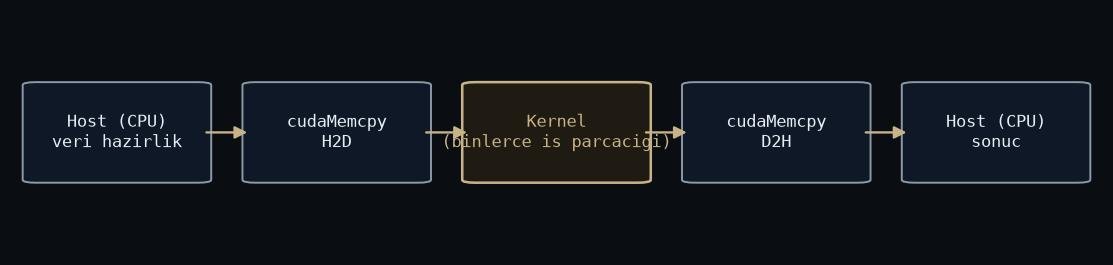
Figure: rendered by me.
So here is the map I wish someone had drawn for me.
CUDA is a platform, not a language
CUDA is the whole stack NVIDIA ships: the driver, the runtime, the nvcc compiler, and a pile of libraries on top like cuBLAS, cuDNN, cuFFT and NPP. TensorRT sits on that stack too. When you run a YOLO model on a GPU, you are using CUDA in this sense without writing a line of it. Most people who “use CUDA” live entirely at this layer, and that is fine. It is the correct layer for most work.
CUDA C: you write the kernels
One layer down is CUDA C, the C++ extension where you write __global__
functions and think in grids, blocks and threads. You get total control and
total responsibility: memory coalescing, occupancy, shared memory, race
conditions that only appear under load.
When is it worth it? Two cases in my experience. First, an operation that no library provides. Second, fusing steps to kill memory round trips. Our preprocessing chain, resize plus colour conversion plus normalisation, ran as three library calls with three trips through memory. Fused into one kernel, it is one trip. That kind of win is real, but you only reach for it after a profiler tells you to, not because kernels feel more serious.
The OpenCV CUDA module: someone else’s kernels
In between sits cv::cuda. You upload a frame into a GpuMat, call functions
that mirror the CPU API, and download the result. Coverage of classic
operations is decent: filtering, warping, optical flow, background subtraction.
Two caveats from the field. One: the pip wheels do not include it. You compile OpenCV yourself with CUDA enabled, and on Jetson that build is its own afternoon. I covered board setup in the JetPack post. Two: mirrored API does not mean mirrored performance. Some functions are dramatically faster than CPU, some are barely faster, a few are slower for small images. Measure on your frame size, not on faith.
The real cost is the transfer, not the compute
The mistake that unites all three layers: treating the GPU as a fast function you call occasionally. Every upload and download crosses a bus, and a fast kernel sandwiched between two copies is a slow pipeline. The fix is architectural. Decode on the GPU if you can, keep the frame resident, run the whole chain there, and download only the results, which for a detector is a handful of boxes, not an image.
Jetson complicates this in a good way: CPU and GPU share physical memory, so zero-copy paths exist. They are not automatic. You still have to choose the right allocation type, and the default is rarely it.
How I actually choose
My order is boring and it works. Library first: OpenCV CUDA, NPP, TensorRT for inference. Custom CUDA C only where the profiler points, which so far has meant preprocessing fusion and one postprocessing step. And honestly, sometimes the answer is the CPU: for small images or logic-heavy code, a few OpenMP threads beat the transfer overhead entirely. I wrote about that trade-off in OpenMP vs CUDA.
Know which layer you are standing on. Most GPU “optimisation” failures I have seen were not slow kernels. They were the right code at the wrong layer.