I have shipped defence training simulations on Quest hardware, built in Unity, and most of what I know about the platform came from things that looked fine in the editor and fell apart on the device. These are the notes I would hand to someone starting their first Quest project. If you are still deciding whether the project should be VR at all, I sorted the letters out in an earlier post.
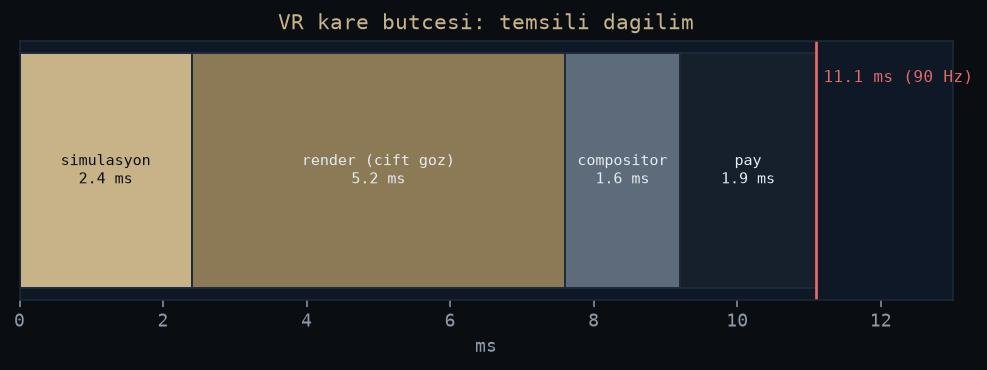
Figure: rendered by me.
A phone strapped to your face
The Quest runs a mobile chipset with a mobile thermal budget and no cable to a desktop GPU. Every habit you bring from PC VR dies here: dynamic lights everywhere, heavy post-processing, high-poly assets, real-time shadows by default. The honest mental model is a mobile game that renders everything twice, once per eye, while a fan the size of a coin fights to keep the chip cool.
That is not a complaint. Standalone is exactly why the device works for training. No PC, no tether, nobody tripping over a cable mid-scenario. In our defence training simulations the missing cable is the feature the customer notices before any shader. You pay for it in rendering budget, and that budget is not negotiable.
Frame rate is a contract
On a monitor a dropped frame is a stutter. In a headset it is nausea. The baseline refresh on Quest is 72 Hz, and you treat it as a contract with the user’s inner ear, not a target you approach. Two consequences follow.
First, draw calls matter more than polygons. The GPU moves more geometry than people expect. What kills you is the CPU-side cost of many separate materials and objects. Batching, texture atlases and single-pass instanced rendering are the difference between a kept contract and a broken one. Fixed foveated rendering gives GPU time back by drawing the periphery at lower resolution. Turn it on early. It is nearly free.
Second, set the budget per scene before anyone builds content. Retrofitting performance into a finished scene is misery. Budgeting it up front is a spreadsheet.
The editor lies, the device does not
Editor numbers on a desktop GPU say nothing about a mobile chip that throttles as it heats. Profile on the device, from the first week, with a real build. The build-and-deploy loop over adb is slow enough that you will be tempted to stay in the editor for “one more feature”. Resist. Every editor-only week is a week of invisible performance debt. And build on OpenXR from the start: vendor-specific integration paths age badly on this platform.
Input and comfort are architecture
Hand tracking is genuinely good now, and I still default to controllers for training. For menus and calm instructional steps, hands are fine, and putting the controllers down lowers the barrier for trainees who have never held a gamepad. Under fast movement and high stress, tracking confidence drops exactly when the scenario matters most. My thesis work measures stress in VR through a biocybernetic loop. I put users under load on purpose, and input that stays reliable under load beats input that looks elegant in a demo.
Comfort belongs in the same bucket. Locomotion, turning, vignettes: these are architectural decisions, not polish. Test with people who do not play games, because trainees are not gamers. A design a developer tolerates for eight hours can make a first-time user quit in three minutes, and a training tool that makes trainees ill does not get a second session, whatever its content is worth.
References
- Meta Horizon developer documentation: https://developers.meta.com/horizon/
- Meta Quest, Wikipedia: https://en.wikipedia.org/wiki/Meta_Quest
- OpenXR, Wikipedia: https://en.wikipedia.org/wiki/OpenXR
- Foveated rendering, Wikipedia: https://en.wikipedia.org/wiki/Foveated_rendering